|
Living Without Big Tech Is Doable: Browser, Email, Search, DNS and Office, Step by Step
Leaving Google and Microsoft seems impossible. It isn't. Browser, search, email, DNS and office: the FOSS alternatives I actually use, verifiable and free.

This morning Filippo (not his real name) excitedly told me he’d just installed the Vivaldi browser on his wife’s new computer, as a first step to “detox her from Big Tech.” While I was enjoying my usual macchiato, it nearly went down the wrong way. Not because Vivaldi on a Windows machine is a bad choice: it pulls you out of the orbit of Microsoft Edge and its default search engine, Bing. But because Filippo, until the day before, had been a fervent defender of Brave, an open-source, privacy-first browser.
Vivaldi today uses Startpage as its default search engine, a Dutch service that shows Google results without tracking you, though it’s worth knowing that since 2019 Startpage has been majority-controlled by System1, an American advertising company. Still, it’s a small step for his wife, a giant leap toward living without Big Tech, at least in the popular perception.
Vivaldi is a browser developed by a company based in Norway and Iceland, built on Google’s open-source Chromium engine. About 95% of the code is open (92% comes from Chromium, 3% from Vivaldi itself), but the user interface, the part you see and interact with every day, is proprietary and distributed in obfuscated form. The company admits this openly: it’s what sets them apart from the competition, and they don’t intend to make it verifiable. For someone trying to build a path toward digital independence, it’s a murky choice.
That said, living without Big Tech doesn’t mean using exclusively European software; it means reducing your dependence on centralized technological models. The political risk of the moment is exactly this: “European software” and “digital sovereignty” risk becoming marketing labels that simply move the money from American Big Tech to European Big Tech. The right question isn’t “where is it based?” but “who controls what, and can I leave whenever I want?” European origin is a bonus (jurisdiction, GDPR, less exposure to the CLOUD Act), not the criterion. The criterion is control: open code, data portability, decentralization, self-hosting.
If you use Windows, good news: adopting open-source software doesn’t require changing your operating system, it runs perfectly well there too. Windows stays 100% proprietary and is Big Tech in full. But it’s also the hardest piece to replace, so it’s last in line, not first. In the meantime you tame it: aim for a local account instead of a Microsoft account, telemetry cut to the minimum, and you run the open-source tools we’re discussing on top of it. The logic is the one from finance: you don’t bet everything on a single asset, you diversify. The same applies here: choosing different tools for browser, email and search sharply reduces your exposure, and with it the profiling.
Table of contents
A step back
There was a time when the Internet was something different. Your email came from the provider that sold you your connection: Italian ISPs like TIM, Libero, Tiscali, Virgilio. Everyone had their own, messages traveled in the clear, but nobody fed them to an algorithm to profile you! Google only did search, and did it well: you typed a word, you found what you were looking for. Advertising was a clickable 468×60 pixel banner that took you to the product’s website. No algorithm, no profile, no history. Windows ran your programs. The Netscape web browser turned HTML into something readable. Neutral tools, at the service of whoever used them.
Then something changed. Not all at once, and not with an announcement, but gradually, one service at a time: when Google realized that search data was worth more than the search itself, when Facebook turned user profiles into advertising profiling, when Windows started collecting telemetry and pushing subscriptions, the business model quietly shifted from you as a customer paying for a service, to you as a product in exchange for a free service.
Open-source code has no borders
First, a clarification: open-source code released under the GPL license remains the property of its author, but anyone who receives it gets the irrevocable right to use, modify and redistribute it, including hosting it on any infrastructure. FOSS (Free and Open Source Software) code already distributed and hosted in Europe cannot be unilaterally revoked or banned by anyone, not even the United States.
Linux was created by a Finn and developed by contributors of every nationality. It’s neither “European” nor “American”: it belongs to everyone. The same goes for Firefox: the code of Firefox and its Gecko engine, together with its developer community, is global, exactly like the Linux kernel. Take LibreOffice: The Document Foundation is based in Berlin and was born explicitly in 2010 as an independent European fork of OpenOffice, after Oracle had taken control of it by acquiring Sun Microsystems and the community feared for the project’s future.
The real dividing line isn’t where the software is born. It’s whether you can read it, verify it, modify it, redistribute it. Open source versus closed source. Transparent versus black box. This is the philosophy I use to choose the alternatives I rely on. When you add a European base for the provider on top of that, the result is even more solid: data handled by European companies isn’t subject to the American CLOUD Act, the 2018 US federal law that lets American law enforcement obtain, via warrant, any data controlled by companies under US jurisdiction, wherever in the world that data is physically hosted.
The European base is the added value. If you need a map to start from, european-alternatives.eu catalogs dozens of categories (email providers, VPS, web analytics, storage and more) of services based in Europe, not just the EU but also EFTA countries like Switzerland and the United Kingdom, plus several open-source projects you can self-host.
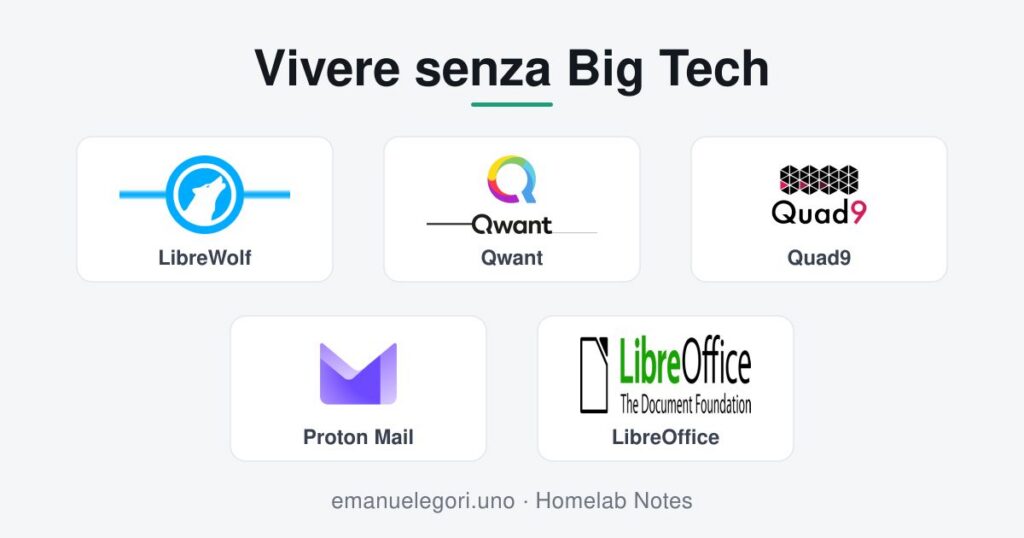
The browser: LibreWolf
The first step is the browser, because it’s the window through which almost everything you do online passes. And the browser I recommend to anyone starting this journey is LibreWolf.
LibreWolf is a build of Firefox with substantial differences:
- No telemetry. Firefox, in its standard version, sends data to Mozilla. LibreWolf removes all of that.
- Privacy configured by default.
resistFingerprintingis on, trackers are blocked, third-party cookies are disabled. You don’t need to touch anything. - uBlock Origin preinstalled. The best ad and tracker blocker out there is already there, ready to go.
- Code hosted on Codeberg. Codeberg is a non-profit organization registered in Berlin, founded in September 2018, with the explicit goal of hosting free and open-source projects away from commercial platforms. Servers in the European Union, no tracking, no data-based business model.
librewolf/bsys6
Codeberg
Mirror of https://librewolf.dev/librewolf/bsys6
An honest heads-up: some sites may behave unexpectedly, because the hardened default protection comes at a cost in compatibility. In most cases it’s solved with a targeted exception in the settings.
For anyone coming from Edge and Bing, LibreWolf is a huge step up. And for anyone already using Vivaldi who wants to take the next step, LibreWolf is the right direction: the same approach to privacy, but with fully verifiable code.
The search engine: Qwant
Google logs every search, builds a profile on you, and uses that data to sell you ads. There are alternatives that don’t.
Qwant is a French search engine launched in 2013 and based in Paris, which states that it doesn’t profile users or sell their data to advertisers. Its servers are in Europe and the service operates under the GDPR. Part of its results passes through Bing’s APIs, a dependency Qwant is trying to reduce: in November 2024 it announced a partnership with Ecosia to build an autonomous European search index, independent of both Google and Microsoft.
The DNS: Quad9
DNS is the phone book of the internet: it turns site names into their addresses. By default, your internet provider handles these requests and can see all of them. Google (8.8.8.8) and Cloudflare (1.1.1.1) offer fast DNS, but they log data.
Quad9 is a non-profit foundation based in Zurich, formally established on 17 February 2021. It doesn’t log IP addresses, it’s compatible with the GDPR and Swiss privacy law, and it blocks malicious domains in real time using threat intelligence from numerous security providers. The Swiss government has explicitly guaranteed that Quad9 is exempt from user-logging obligations.
I’ve written a dedicated article on configuring Quad9 and other European DNS resolvers on Firefox and Chrome, if you want to dig into the technical side.
Email: leaving Gmail for Proton Mail
Gmail is free because you are the product. Since 2017 the ads between your emails no longer come from reading your messages: what profiles you is your entire Google account, with the “signals” it gathers everywhere. Leaving Gmail means picking a new provider.
The most solid options based in Europe are Proton Mail (Switzerland, end-to-end encryption) and Tuta (Germany, formerly Tutanota). Both offer free accounts with servers in Europe and no content scanning.
I use Proton Mail. The free version gives you 1 GB of space and a yourname@proton.me mailbox. Proton Mail is the largest end-to-end encrypted email service in the world, with over 100 million users reached in 2024. When you send an email to another Proton user, the message is encrypted on your device and can only be decrypted by the recipient: not even Proton can read it. It’s end-to-end, zero-access encryption, without you having to do anything technical. Beyond mail, Proton also offers a VPN, cloud storage (Proton Drive), a calendar and a password manager (Proton Pass), all with the same privacy-first philosophy.
The office suite: LibreOffice runs on Windows too
Microsoft Office is everywhere, but it isn’t mandatory. LibreOffice is a complete suite that includes Writer (the Word equivalent), Calc (Excel), Impress (PowerPoint), Base (Access) and Draw. It’s free, open source, available for Windows, macOS and Linux, and it collects no usage data.
The point I want to stress is that LibreOffice runs on Windows. You don’t need to switch operating systems to start using it. You can install it today, on any computer, and open your existing .docx and .xlsx files. Compatibility isn’t 100% perfect on documents with very complex formatting, but in everyday practice, for the vast majority of users, it works without problems.
Where to actually start
If I have to suggest an order, this is the path I recommend:
- Browser: LibreWolf, Vivaldi, Brave or Firefox. It’s the step with the highest benefit-to-effort ratio. It installs like any other software and works right away.
- Search engine: Qwant, Startpage, Brave Search or DuckDuckGo. You set it as the default in your browser in no time. You use it like Google, but without being profiled.
- DNS: Quad9, DNS4EU or dnsforge. You configure it once in your home router and it covers every device on the network.
- Office: LibreOffice. You install it on Windows without touching anything else. You use it like Microsoft Office.
- Email: Proton Mail. This is the step that takes the most care, because it means moving your contacts and sharing your new address. But the free version is already more than enough to start. You use it like Gmail.
None of these steps requires any particular technical skills. All of them are reversible. All of them are free.
Conclusion
Dependence on Big Tech is the result of choices made for us, often without our noticing, in exchange for convenience. None of the alternatives in this list is exhaustive, but each one works and can be verified by anyone who wants to, and together they prove that living without Big Tech is doable.
The question I’ll leave you with is: do you want to keep being the product, or would you rather become the user?
Sources and references
Browser
- LibreWolf, official site
- LibreWolf on Codeberg
- LibreWolf release notes
- Codeberg, Wikipedia
- Vivaldi and open source, official Vivaldi blog
Search engines
- Startpage, the privacy-first Dutch search engine
- Qwant, about
- Ecosia and Qwant: European Search Perspective
DNS
- Quad9, official site
- Quad9 Foundation in Switzerland, NCSC
- DNS and privacy: the best European alternatives, Homelab Notes
Email and office
- Proton Mail, official site
- Proton Mail, Wikipedia
- Tuta, official site
- LibreOffice, official site
- The Document Foundation, Wikipedia
- CLOUD Act, Wikipedia
Web centralization
- Fastly, post-mortem of the 8 June 2021 outage
- CrowdStrike outage, 19 July 2024, Wikipedia
- Cloudflare statistics 2026
European alternatives directory
Fediverse Reactions




Follow this blog via RSS
What Is RSS and Why It Still Matters in 2026
This post also lives in the Fediverse. To comment on this blog post, use the comment box below or copy and paste this address into the search box of your instance to reply to it, boost it or add it to your favourites: https://emanuelegori.uno/en/living-without-big-tech-is-doable-browser-email-search-dns-and-office-step-by-step/
You can also write to me directly: @emanuelegori@mastodon.uno

My name is Emanuele Gori and in my spare time I write about open source software, digital privacy and self-hosting.
Homelab Notes was born from my belief that technology should serve the people who use it, not the ones who sell it. Here you'll find practical guides and analyses to help you reclaim control of your digital life, one service at a time.
This blog is customized with a few WordPress plugins I built to improve its usability and sharing: open source and freely downloadable from git.emanuelegori.uno.
If you'd rather follow part of my digital life, visit the Activity Hub page.
On the Fediverse as in life: no algorithms in between!