|
EG Social Timeline WordPress plugin: a unified timeline for Mastodon, Bluesky, Forgejo and Diggita

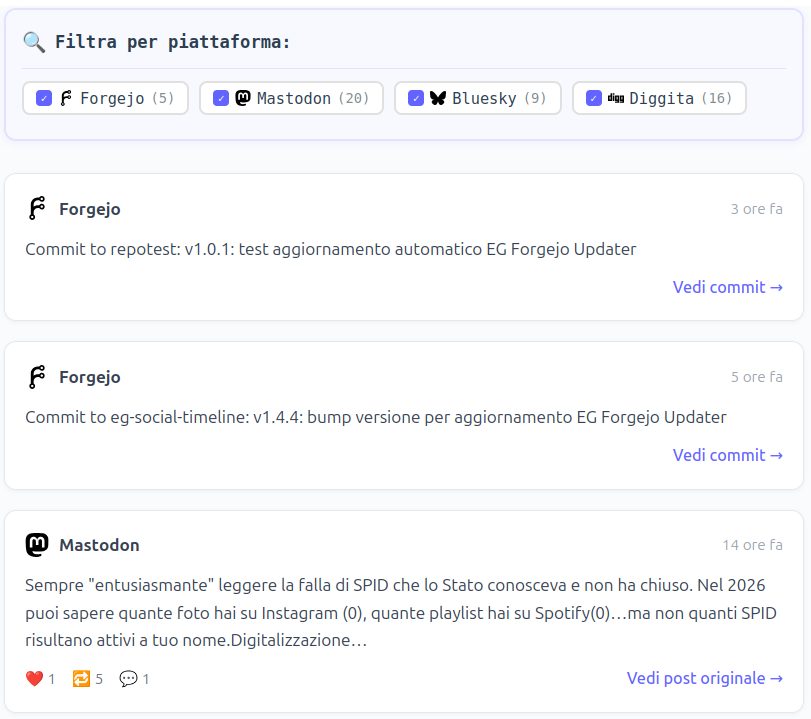
For a while I’ve felt the need to bring back to WordPress something that today feels almost revolutionary: an activity hub page that lets friends, readers, and curious visitors see what I’m doing online without chasing links across different platforms.
Note: the screenshots in this article show the Italian localization. The plugin itself is in English; the Italian translation is bundled with it (or available separately, depending on the plugin).
EG Social Timeline imports social feeds without JavaScript, without tracking, without handing data to third parties. Pure PHP, HTML, and CSS, without depending on proprietary APIs, without invasive widgets, without half a framework just to display lines of text. Caching uses WordPress’s native infrastructure, with no extra tables, no complications.
Table of contents
What EG Social Timeline is
EG Social Timeline is a WordPress plugin that pulls public activity from Mastodon, Bluesky, Forgejo, and Diggita, sorts it chronologically, and displays it on a page through a shortcode.
It’s free software, GPL-2.0-or-later licensed, and the source code is public on my self-hosted Forgejo.
It’s still under active development but I use it every day and improve it as I go. It’s not yet on the official WordPress plugin repository.
A note about updates
Since EG Social Timeline isn’t hosted on WordPress.org Plugins, it doesn’t auto-update like official plugins do: WordPress doesn’t know it exists and won’t check for new releases.
You have two options to keep it up to date. The first is manual: periodically check the repository for new versions, download the zip, and install it from Plugins > Add new > Upload plugin.
The second is to use EG Forgejo Updater, another plugin that adds automatic update support for plugins hosted on Forgejo. With Forgejo Updater installed, EG Social Timeline updates exactly like a regular WP plugin.
Supported platforms and how they’re queried
Each platform uses a different mechanism to expose public data, and the plugin handles each one appropriately.
Mastodon
The plugin uses the public Mastodon v1 API — no keys, no tokens. All you need is the profile URL (e.g. https://mastodon.uno/@emanuelegori). The plugin extracts the instance and username from the URL, resolves the account ID via the /api/v1/accounts/lookup endpoint, then fetches the statuses.
You can choose whether to include boosts or show only original posts. The API supports the exclude_replies and exclude_reblogs parameters, so filtering happens server-side, not client-side.
Bluesky
Bluesky exposes a public ATP API (public.api.bsky.app) that doesn’t require authentication. All you need is the handle (e.g. emanuele.bsky.social). The plugin uses the app.bsky.feed.getAuthorFeed endpoint with the posts_no_replies filter — only original posts, no replies in the feed.
The URL of each individual post is reconstructed from the at:// URI contained in the response: the rkey is extracted and the URL bsky.app/profile/{handle}/post/{rkey} is composed. It works reliably even without authentication.
Forgejo and Gitea
The plugin queries the public Forgejo API to get the list of the user’s public repositories, then fetches the most recent commits from each. The total configured limit is distributed evenly across all repos: if you have 5 public repositories and set a maximum of 10 commits, the plugin takes 2 per repo. The goal is to prevent a project you’re working on intensively from monopolising the whole timeline at the expense of the others.
Commits from private repositories are never included. It works with any Forgejo or Gitea instance.
Diggita
Diggita exposes a public RSS feed per user. The plugin parses it with simplexml_load_string and does additional parsing of the description to extract points and comments — information that in the Diggita feed is embedded in the description field as HTML text, not as separate metadata.
Per-platform filters without JavaScript
One of the technical choices I’m most pleased with: the per-platform filters don’t add any JavaScript to the page.
The trick is the classic checkbox + label + sibling selector pattern in pure CSS. Checkboxes are generated before the timeline container, so clicking a platform’s label hides it from the timeline.
Cache and performance
Each timeline load would potentially make four external HTTP requests. To avoid that, the plugin uses WP Transients — WordPress’s built-in cache system — with a configurable duration from 30 minutes to 24 hours.
When you save settings, the cache is invalidated automatically. There’s also a button to flush it manually from the configuration page, useful when you’ve just published something and want it to appear right away.
Security: SSRF protection
The plugin accepts URLs configured by the administrator (Forgejo instance, Mastodon profile). There’s a real risk of SSRF (Server-Side Request Forgery) if those URLs were to point at internal server resources.
That’s why I implemented a validation function eg_social_timeline_is_public_url that rejects private IP addresses, localhost, and any hostname that resolves to a private or reserved IP. The check uses gethostbyname and FILTER_FLAG_NO_PRIV_RANGE | FILTER_FLAG_NO_RES_RANGE. It’s not a trivial check, and it’s applied to all external URLs before any HTTP request is made.
How to use it
Installation is the standard WordPress plugin install. Once activated, go to Settings > EG Social Timeline, configure your profiles, and insert the shortcode [ eg_social_timeline] (without the space) on the page or post where you want to show the timeline.
From the settings you can set a limit for each platform: for Mastodon and Bluesky the limit is passed directly to the API, which returns only the requested number; for Diggita and Forgejo the plugin downloads the available data and then trims to the configured limit. Either way the result is the same: no platform can monopolise the timeline at the expense of the others.
The limit parameter is optional: [ eg_social_timeline limit="20"] (without the space) overrides the limit configured in the settings.
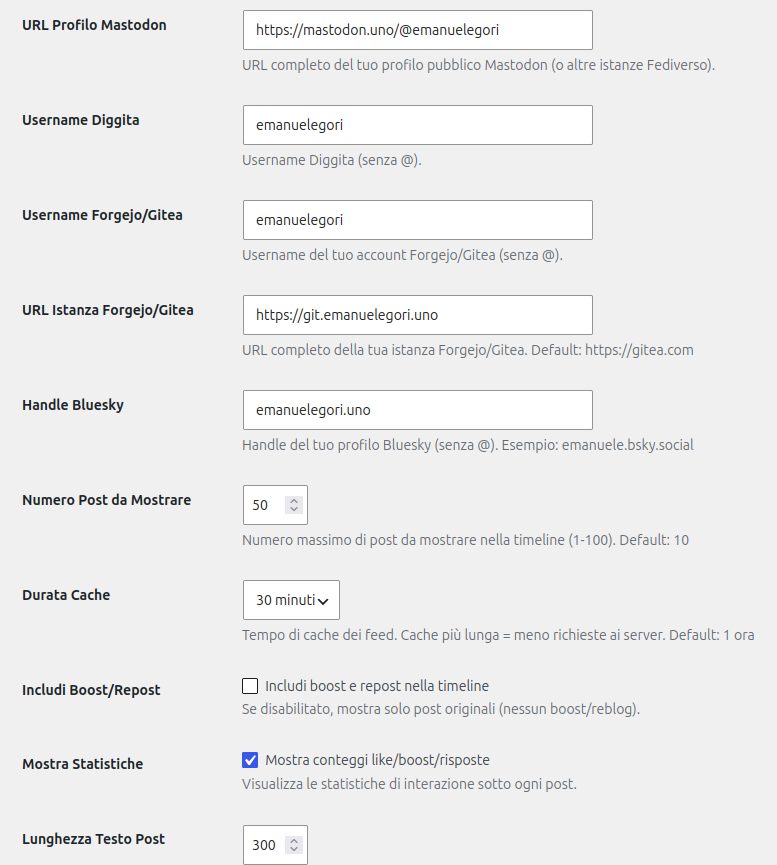
taken from the Italian version.
What’s still missing — Release v1.2.0
Being honest about the development status is more useful than any marketing. These are the features I have in mind or that are missing:
- Pagination or “load more”: for now the timeline shows a fixed number of posts
- Support for more Fediverse platforms: the plugin works with any Mastodon-compatible instance, but doesn’t yet have explicit support for Pixelfed, Peertube, or similar
- Gutenberg block editor: for now there’s only the shortcode, no dedicated block
- Images and media: posts with attachments only show the text
- Complete translations: Italian and English are partially supported, but the
.pofiles aren’t complete
⭐ Got questions about the plugin, want to report an issue, or just want to tell me how you’re using it? Leave a comment below.
Sources and references
emanuelegori/eg-social-timeline
Forgejo
A WordPress plugin to display a unified timeline of social media activity from Mastodon, Bluesky, Diggita, PeerTube and Fogejo.
OWASP: Server-Side Request Forgery (SSRF) — reference for the protection implemented
EG Social Timeline repository — source code, changelog, instructions
EG Forgejo Updater — plugin for automatic updates from Forgejo
Mastodon v1 API documentation — public endpoints used by the plugin
AT Protocol (Bluesky) — Public API — getAuthorFeed endpoint
Forgejo API documentation — repos and commits endpoints
Fediverse Reactions


Follow this blog via RSS
What Is RSS and Why It Still Matters in 2026
This post also lives in the Fediverse. To comment on this blog post, use the comment box below or copy and paste this address into the search box of your instance to reply to it, boost it or add it to your favourites: https://emanuelegori.uno/en/eg-social-timeline-wordpress-plugin/
You can also write to me directly: @emanuelegori@mastodon.uno

My name is Emanuele Gori and in my spare time I write about open source software, digital privacy and self-hosting.
Homelab Notes was born from my belief that technology should serve the people who use it, not the ones who sell it. Here you'll find practical guides and analyses to help you reclaim control of your digital life, one service at a time.
This blog is customized with a few WordPress plugins I built to improve its usability and sharing: open source and freely downloadable from git.emanuelegori.uno.
If you'd rather follow part of my digital life, visit the Activity Hub page.
On the Fediverse as in life: no algorithms in between!